CyanHero

Digital Negatives for UV Art

macOS 14.0+
8+ Preset Curves
Real-time Preview
2 Preview Modes
UV Print Ready

About

A professional macOS application designed for cyanotype and alternative process photographers. Create perfect digital negatives with tone curve adjustments, real-time preview, and precision controls optimized for UV exposure printing.

Screenshots

See the app in action
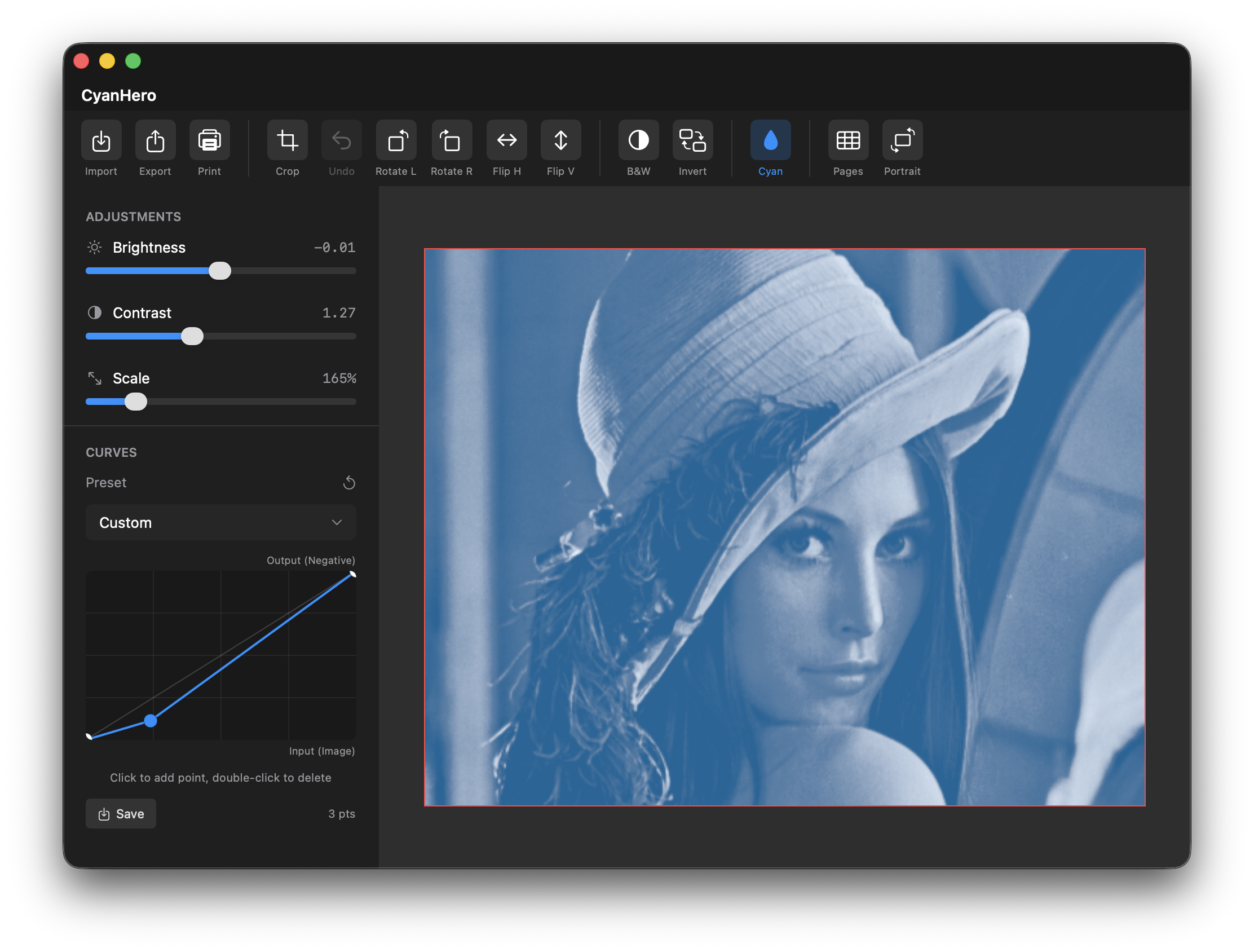
CyanHero App Interface

Cyanotype Preview Mode

Real-time preview of your digital negative with tone curve adjustments. Toggle between B&W negative view and blue cyanotype preview to see exactly how your final print will look.

Key Features

Everything you need for professional alternative process printing

📊

Tone Curve Editor

Professional tone curve adjustments with support for Photoshop .acv files. Fine-tune your negatives for perfect exposure.

🎨

Process Presets

Built-in curves for Cyanotype, Van Dyke Brown, Platinum/Palladium, Gum Bichromate, and more alternative processes.

👁️

Dual Preview Modes

Toggle between negative (B&W) preview and cyanotype (blue) preview to see how your final print will look.

Real-time Processing

Instant preview of all adjustments. See contrast, brightness, and curve changes applied immediately as you work.

🔧

Transform Tools

Rotate, flip, crop, and scale your images. All the tools you need to prepare your negatives for printing.

🖨️

Print & Export

Print directly to transparency film or export as PNG, JPEG, or TIFF. Multi-page printing for large format work.

Cyanotype Workflow

From digital image to classic Prussian blue print

1

Import

Load your photo into CyanHero

2

Adjust

Apply tone curve and adjust contrast

3

Preview

Check blue preview mode

4

Print

Output to transparency film

5

Expose

UV expose onto cyanotype paper

6

Develop

Wash in water to reveal the print

Image Processing Controls

Professional-grade adjustment tools

Contrast Control

Range: 0.5 - 2.5
Adjust tonal separation for optimal printing

Brightness Control

Range: -0.5 - 0.5
Fine-tune overall density

Scale Adjustment

Range: 10% - 1000%
Resize for any print format

Rotation Tools

90° increments left or right
Perfect orientation every time

Flip Controls

Horizontal and vertical mirroring
Essential for contact printing

Crop Tool

Select and crop to specific area
Undo crop to restore original

Supported Alternative Processes

Optimized presets for popular UV printing techniques

Cyanotype

Classic Prussian blue prints. Preset curve optimized for UV-sensitive iron salts.

Van Dyke Brown

Rich brown tones. Curve adjusted for silver-based emulsion response.

Platinum/Palladium

Archival noble metal prints. Two preset curves for different paper types.

Gum Bichromate

Multi-layer color printing. Optimized for dichromate sensitivity.

Photopolymer

Modern polymer gravure. Curve for precise exposure control.

Custom Curves

Load and save your own .acv curve files for any process.

Get CyanHero

You can download CyanHero for free from GitHub, but if you want it ready to run without the hassle of compiling and you would like to thank me for my work, you are welcome to purchase it from the App Store for a small fee, which would make me very happy and motivate me to continue developing the app.

System Requirements

  • macOS 14.0 or later
  • Apple Silicon or Intel Mac
  • Minimum 4GB RAM
  • 50MB free disk space